
WhatsApp username — three words that are about to change how billions of people share their contact information online. If you’ve ever felt uncomfortable handing your personal phone number to someone you just met at a wedding, a work event, or a neighborhood group chat, you already understand exactly why this update matters.
WhatsApp, owned by Meta, has clearly been listening to its users. The platform just announced a long-awaited feature that allows people to connect using a simple, custom WhatsApp username instead of a phone number. It’s one of those updates that feels small on paper but makes a real difference in everyday life.
In this guide, I’ll walk you through everything you need to know: what a WhatsApp username actually is, why Meta built it, how to reserve your own WhatsApp username step by step, and an honest look at its benefits and drawbacks.
Quick answer: A WhatsApp username is a unique identity that lets people contact you without seeing your phone number. It improves privacy while making it easier to connect with new contacts, businesses, and communities, and it can be reserved in advance through your WhatsApp account settings.
Table of Contents
- What Is the WhatsApp Username Feature?
- Why WhatsApp Introduced Usernames
- How the Feature Works
- Step-by-Step Guide to Reserve Your Username
- Benefits
- Drawbacks
- Phone Number vs Username: A Quick Comparison
- Future of WhatsApp Usernames
- FAQs
What Is the WhatsApp Username Feature?
In simple words, a WhatsApp username is an identity you create on the app that replaces your phone number when you’re talking to new people. According to the official WhatsApp announcement, sharing a phone number can feel like a big step when someone new walks into your life, whether it’s a classmate, a neighbor, or someone you meet at an event, because a phone number is personal and tied to so many parts of your life.
That’s the exact problem a WhatsApp username solves. Sometimes people simply want to chat without handing over their personal digits, and WhatsApp has finally built a proper solution for that. It’s part of a broader push toward better privacy and tighter control over who can reach you.
This isn’t just useful for one-on-one chats either. Think about parent-teacher groups, society chats, or sports team groups. Many people want to join a group without giving their phone number to a bunch of strangers. A WhatsApp username solves exactly that kind of everyday awkwardness.
Why Is WhatsApp Launching Usernames Now?
With a global user base of over three billion people, name overlap is a real issue. A lot of names overlap, which is why WhatsApp is opening reservations early so everyone gets a fair shot at the username that matters to them.
This also lines up with how Meta has been positioning WhatsApp lately: as the most privacy-focused app in its family of products, alongside Facebook, Instagram, and Messenger. Meta has slowly been rolling out privacy-first features across these platforms, and usernames are simply the next logical step for WhatsApp.
Interestingly, creators, small businesses, and organizations who want a consistent online identity will be able to claim their existing Instagram or Facebook username on WhatsApp. This is a smart move from Meta because it ties WhatsApp’s identity system directly into its broader ecosystem, making cross-platform branding much easier for businesses and influencers.
How Does the WhatsApp Username Feature Actually Work?
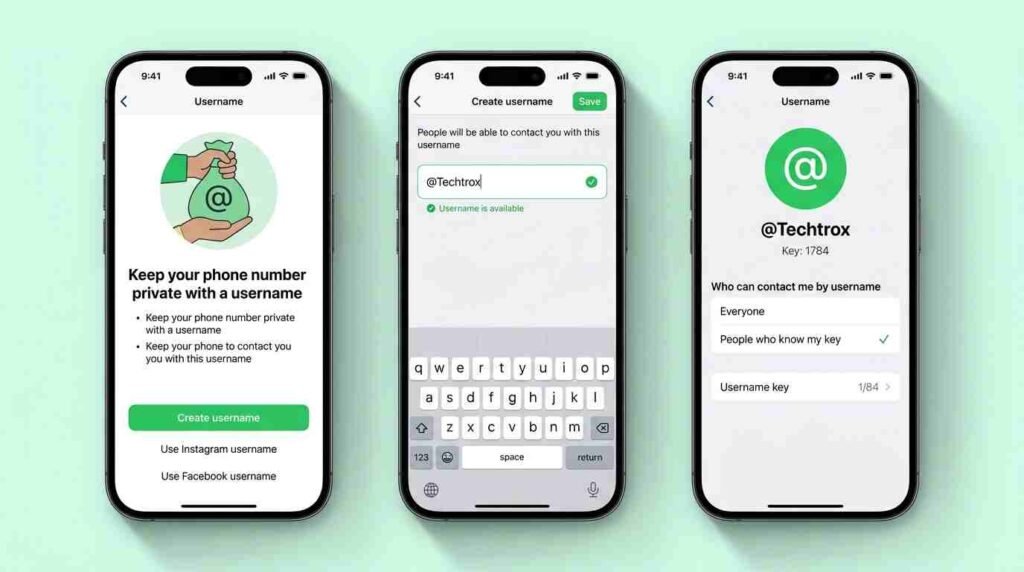
Before jumping into the how-to guide, it helps to understand the mechanics behind this update, because it’s not just a cosmetic name change.
- No public directory – There is no directory to browse and no suggestions; people need to know your exact username to contact you for the first time. So nobody can simply search and stumble upon your profile.
- An optional security layer – WhatsApp has also built an optional setting that lets you require people to know an additional piece of information, beyond just your username, before they can message you. This gives you a second layer of control over who can start a conversation with you.
- Phone number stays hidden – Once usernames roll out, when someone messages you for the first time, they will no longer see your phone number if you’ve enabled your username.
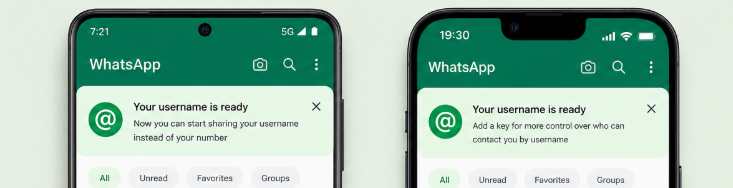
- Gradual global rollout – WhatsApp will roll out usernames gradually over the coming months and will notify users in the app once it’s available in their country.
So essentially, a WhatsApp username gives you a controlled, private way to be reachable without exposing your number, while still keeping the door shut to randoms who might try to spam you. As a result, your overall account settings become more flexible than before.
Step-by-Step Guide: How to Reserve Your Username
Here’s the part most people actually came for. Reserving your WhatsApp username is genuinely simple. That said, availability can vary by account and region, so the steps below reflect how the process works once the option appears for you.
Step 1: Update WhatsApp to the Latest Version
Before anything else, make sure you’re running the latest version of WhatsApp from the Play Store or App Store. Once the feature reaches your account and you’ve updated the app, you’ll see the Username option appear in settings.
Step 2: Open Settings
Launch WhatsApp and tap on the Settings tab, usually found at the bottom or top right corner depending on your device.
Step 3: Go to Account
Inside Settings, tap on Account. This is where your identity and privacy-related controls live, including two-step verification and now, usernames.
Step 4: Tap on Username
If the feature is available on your account, you’ll see a new option called Username. Reserving it takes just a few seconds once you’re in this menu.
Step 5: Choose Your Username
Type in the username you want. Since names overlap fast with three billion-plus users, try to:
- Keep it short and memorable
- Avoid extremely common names (like “ahmed123” or “john”)
- If you’re stuck for ideas, WhatsApp has mentioned offering suggestions to help you land on something available and personal to you
Step 6: Reserve It
Once you’re happy with your choice, hit reserve. That’s it, your WhatsApp username is locked in for when the feature fully rolls out in your country.
Step 7: Wait for the Official Rollout
This part is important: reserving a username today doesn’t necessarily mean it’s active yet. WhatsApp is gradually rolling out this feature region by region, and the app will send an in-app notification once it’s live where you are.
If you’re interested in earning through the Facebook Affiliate Partnerships Program, don’t miss our article it covers everything you need to know to get started.
Benefits of the WhatsApp Username Feature
Let’s be real, this update brings a genuinely useful upgrade to everyday privacy. Here are the standout benefits:
- Better privacy – You no longer need to share your real phone number with new contacts, classmates, or random group members.
- Safer group chats – Parent groups, hobby clubs, and community chats become far less risky since your number stays hidden.
- Brand consistency for creators – Influencers and small business owners can match their identity with their Instagram or Facebook handle, making them easier to find and trust.
- Reduced spam risk – Since there’s no public directory and an optional extra security setting, random strangers can’t just guess their way into your inbox.
- A more professional look for businesses – A clean username like “@SaraDesigns” looks far more professional than sharing a personal number on a business car
Drawbacks and Things to Keep in Mind
No feature is perfect, and it’s only fair to mention the flip side too:
- Username squatting – Just like social media handles, popular or short usernames will get claimed almost instantly, leaving latecomers with awkward, number-filled alternatives.
- A learning curve for less tech-savvy users – Some users might find the extra setup steps a bit confusing at first.
- Gradual rollout frustration – Since the feature isn’t live everywhere immediately, some users may reserve a name and then wait months before they can actually use it.
- Still tied to Meta’s ecosystem – Because usernames can link to Instagram or Facebook, some privacy-conscious users may feel this ties their identity even closer to Meta’s broader data ecosystem.
- Confusion during the transition period – For a while, some contacts will use phone numbers and others will use usernames, which could create temporary mix-ups in shared contacts or groups.
Phone Number vs Username: A Quick Comparison
| Phone Number | Username |
|---|---|
| Visible to new contacts | Hidden by default |
| Personal and tied to other accounts | A more private, separate identity |
| Hard to share publicly | Easy to share on cards, bios, posters |
| Higher risk of spam | Lower risk with optional extra security |
What This Means for the Future of WhatsApp
This update is bigger than it looks on the surface. WhatsApp has spent years building a reputation around end-to-end encryption and privacy, and usernames are a natural next step in that journey. It also signals how Meta is trying to unify identity across Facebook, Instagram, and WhatsApp, without forcing people to give up their phone numbers altogether.
Meanwhile, this also strengthens the platform’s overall security posture, since fewer people will need to expose personal contact details just to join a group or talk to someone new. If you’ve ever hesitated before typing your number into a new group chat, this should make it clear exactly why the update matters.
If you want to earn through Facebook Content MonetizatioFacebook monetization toolsn Tools, make sure to read our article to learn how you can get started and maximize your earning potential.
Final Thoughts
The WhatsApp username feature is a small change with a big impact on everyday privacy. Whether you’re someone who values keeping your number private, a small business owner wanting a clean professional identity, or a creator trying to stay consistent across Meta’s platforms, claiming your WhatsApp username early is worth considering. If the option is available on your account and there’s a specific name you want, reserving your WhatsApp username sooner rather than later may help you secure it before someone else does, given WhatsApp’s massive three-billion-plus user base.
Have you reserved your username yet? Let us know in the comments which one you chose.
Related Articles
FAQs About the WhatsApp Username Feature
1. What is a WhatsApp username? It’s a unique identity that lets people contact you without seeing your phone number, improving privacy while making it easier to connect with new contacts.
2. How do I reserve my username? Update to the latest version of WhatsApp, then go to Settings, Account, and Username, and reserve your preferred name if the option is available on your account.
3. Is reserving a username free? Yes, reserving it through Settings, Account, and Username takes just a few seconds and is completely free.
4. Can I still be reached by my phone number after setting a username? Yes, your phone number still works, but once enabled, your username can replace your number for first-time contacts, keeping your number hidden if you choose.
5. Can I claim my Instagram or Facebook handle on WhatsApp? Yes, WhatsApp has confirmed that creators, businesses, and organizations can reserve their existing Instagram or Facebook username on WhatsApp.
6. What’s the extra security option WhatsApp mentioned? WhatsApp has built an optional setting that adds a second layer of control, requiring people to know more than just your username before they can message you for the first time.
About the Author
[Waqar Ahmad] is a tech content writer with experience covering Meta product updates, app features, and digital privacy trends across WhatsApp, Instagram, and Facebook. follows us official WhatsApp and Meta announcements closely to deliver accurate, easy-to-understand guides for everyday readers.
Official Source: This article is based on official information from the WhatsApp Blog – “It’s time to reserve your WhatsApp username”, published by Meta/WhatsApp.
What is a WhatsApp username?
It’s a unique identity that lets people contact you without seeing your phone number, improving privacy while making it easier to connect with new contacts.
How do I reserve my username?
Update to the latest version of WhatsApp, then go to Settings, Account, and Username, and reserve your preferred name if the option is available on your account.
Is reserving a username free?
Yes, reserving it through Settings, Account, and Username takes just a few seconds and is completely free.
Can I still be reached by my phone number after setting a username?
Yes, your phone number still works, but once enabled, your username can replace your number for first-time contacts, keeping your number hidden if you choose.
Can I claim my Instagram or Facebook handle on WhatsApp?
Yes, WhatsApp has confirmed that creators, businesses, and organizations can reserve their existing Instagram or Facebook username on WhatsApp.
What’s the extra security option WhatsApp mentioned?
WhatsApp has built an optional setting that adds a second layer of control, requiring people to know more than just your username before they can message you for the first time.