📋 Editorial Notice: This article is for informational purposes only. Privacy settings and company policies change often, so confirm the details on each company’s official pages before you act. Nothing here is legal, medical, or financial advice.
📅 Published: October 11, 2026
You have a long email from a client, a confusing bank statement, or a lab report you can’t make sense of. The fastest move feels obvious: paste it into an AI chatbot and ask for a summary. It takes five seconds, and the answer is usually good.
The problem is what happens to that text after you hit send. Most people never think about it, because an AI chatbot feels private, like a notes app. It isn’t. Every AI chatbot is an online service run by a company, with its own storage, its own settings, and in some cases human reviewers.
This guide covers what not to paste into an AI chatbot, why each item is risky, and how to write safe prompts that still get you a useful answer. You’ll also see which settings to change on ChatGPT, Claude, and Gemini, how AI chatbot memory works, and what to do if you’ve already pasted something you shouldn’t have.
Table of Contents
Why Your AI Chatbot Is Not a Private Notebook {#why-it-matters}
Researchers at Stanford studied the privacy policies of six major US AI developers. Their finding was blunt: all six appear to use customer chat data to train their models by default, and some keep that data indefinitely.
Jennifer King, the study’s lead author, also warned that sensitive details may be collected for training even when they sit in a separate file you uploaded during the chat. So attaching a document instead of pasting its text doesn’t make it any safer.
There is also a human side. Google’s Gemini privacy notice says trained reviewers, including people from service providers, read some chats. Google asks users not to enter anything confidential that they wouldn’t want a reviewer to see.
Most people don’t realize how much they already share. In June 2026, DuckDuckGo surveyed 1,944 US adults. About 32% of AI users said they had told an AI chatbot something they kept from people close to them. Another 53% didn’t know, or weren’t sure, that most chatbots train on conversations by default, and only 25% knew AI chats can be subpoenaed.
One caution on that survey: DuckDuckGo sells its own private AI chat, so it has a stake in the topic. The company did publish its method, but treat the numbers as a company-commissioned snapshot, not a final verdict.
The pattern behind these numbers is simple. An AI chatbot feels friendly, so people tell it more than they would ever type into a search box. Safe prompts fix that habit. The idea is straightforward: give the AI your problem, not your identity.
💡 Also Read: [Claude AI 10 Hacks Article]
My Own Rule: Keep Personal Details Away From AI {#my-rule}
My own rule is simple: I don’t give an AI chatbot my personal details. Many cases have already come out online where private information shared with an AI chatbot ended up hurting the person who shared it, and that is reason enough for me.
Look at the cases in this guide. Samsung engineers leaked internal code. Thousands of shared ChatGPT conversations showed up in Google results. A court ruled that a defendant’s chats with a chatbot were not privileged. None of those people set out to expose anything. They treated a chat window like a private notebook.
AI tools can be very useful for drafting, learning, and brainstorming, and I’m not saying you should avoid it. But once personal information is typed in, you can’t fully control where it goes or how long it stays. A privacy mistake is hard to undo, so the safest habit is to never make it.
Real Cases at a Glance: What Went Wrong and What It Teaches {#real-cases}
These are the AI chatbot incidents and policy changes mentioned in this guide, gathered in one place. Each comes from a named source, listed at the end of the article.
| When | What happened | The lesson |
|---|---|---|
| 2023 | Samsung engineers accidentally uploaded internal source code to ChatGPT. Samsung then banned generative AI tools on company devices and networks, according to Bloomberg. | Work code and documents don’t belong in a public tool. |
| July 2025 | Thousands of shared ChatGPT chats appeared in Google results after users ticked a “discoverable” box. OpenAI removed the option. | A share link can turn a private chat into a public page. |
| August 2025 | Anthropic changed its consumer terms so chats can be used for training, with a setting to control it. | Policies change, so recheck your settings now and then. |
| Ongoing | Google’s Gemini notice says human reviewers read some chats, and reviewed chats are not deleted when you delete your activity. | Deleting your activity doesn’t always erase everything. |
| February 2026 | A federal judge ruled in United States v. Heppner that a defendant’s chats with a public AI chatbot were not covered by attorney-client privilege or work-product protection. | Legal questions typed into an AI chatbot may not stay private. |
10 Things You Should Never Paste Into an AI Chatbot {#never-paste}
1. Passwords, PINs, Wi-Fi Keys, and Recovery Codes {#passwords}
Security guides agree on this one: passwords, login codes, two-factor codes, seed phrases, and API keys do not belong in a chat. That includes your Wi-Fi password and temporary passwords someone sent you. No chatbot ever needs your real password to help you.
If a login keeps failing, describe the error message and what you’ve already tried. That’s enough. Store real passwords in a password manager, not in a chat window.
2. Government ID Numbers {#id-numbers}
Social Security numbers, passport details, driver’s license data, and national ID numbers are the raw material for identity theft. If your question involves a form, ask about the form’s fields and rules. Leave your actual numbers out.
3. Bank, Card, and Income Details {#financial}
Card numbers, account numbers, full statements, payroll data, and pay stubs should stay out of any general-purpose chatbot. If you want budgeting help, type your monthly totals by category, such as rent, food, and transport. Rough figures work fine, and the advice is just as useful.
4. Medical Records and Health Details {#medical}
Most mainstream chatbots are not covered by HIPAA, the US health privacy law that binds doctors and hospitals. That means your diagnosis, prescriptions, or lab results don’t carry the legal protection they would at a clinic.
You can still ask general health questions. Ask what a high reading usually means and what to ask your doctor, without your name, dates, or hospital. An AI chatbot is a starting point for questions, not a replacement for a doctor.
5. Legal Problems and Case Details {#legal}
In February 2026, Judge Jed Rakoff of the Southern District of New York ruled in United States v. Heppner that a defendant’s chats with a public AI chatbot were not protected by attorney-client privilege or the work-product doctrine. Prosecutors had found the chats on his devices during a search. You can read a law firm’s summary of the ruling for the details.
The ruling also said that sharing otherwise privileged information with a public AI tool can cost you that protection. Courts are still working through this area, and one Michigan ruling on the same day pointed in a different direction. Until it settles, treat legal chats as not private and talk to a lawyer instead.
6. Work Files, Source Code, Meeting Notes, and Client Data {#work-files}
In 2023, Bloomberg reported that Samsung engineers had accidentally leaked internal source code by uploading it to ChatGPT. Samsung then banned generative AI tools on company devices and networks.
Even if your company hasn’t banned AI, check its policy first. Contracts, HR documents, meeting transcripts, product plans, and anything with client details are the first things to keep out of an AI chatbot. Customer data can also fall under privacy laws and your contracts, so pasting it may create a problem beyond the chat itself.
7. Other People’s Private Information {#other-people}
Friends’ messages, customer lists, student names, a relative’s lab report, and employee records belong to people who never agreed to be pasted into a chat. Information about children deserves extra care.
Swap names for roles, like “my manager” or “a customer,” before you ask for help.
8. Unpublished Work and Business Ideas {#unpublished-work}
A novel draft, a product design, or a business plan is worth protecting. Because consumer chat data may be used for training, some university privacy offices advise against sharing creative work and ideas you want to keep to yourself. Think of this as a precaution rather than proof that anything leaks.
9. Full Screenshots, Private Photos, and Entire Documents {#screenshots}
A screenshot shows more than you meant to share: open tabs, notifications, account numbers, and email addresses. A full document carries headers, footers, and names tucked into the corners. Crop the image or paste only the paragraph you need.
Private or intimate photos should never go into a chatbot at all. A good habit is to edit before you paste.
10. Deeply Personal Confessions {#confessions}
Talking through a rough day in general terms is fine. But names, identifying details, and anything illegal should stay out. Because some providers use human review, treat every conversation as something a stranger could read. If you’re struggling, a trusted person or a professional is a better place for the full story.
What Is Actually Safe to Paste Into an AI Chatbot {#safe-to-paste}
Privacy advice often sounds like “never use AI,” which isn’t realistic or necessary. Plenty of everyday tasks carry little risk.
- Public information: published articles, public web pages, and text you’ve already posted online.
- General questions: “How does compound interest work?” needs no names or numbers.
- Your own drafts, cleaned up: an email or essay with names, numbers, and addresses replaced by placeholders.
- Code with secrets removed: swap real keys and passwords for labels like
YOUR_API_KEY. - Made-up sample data: fake names and figures that behave like the real thing.
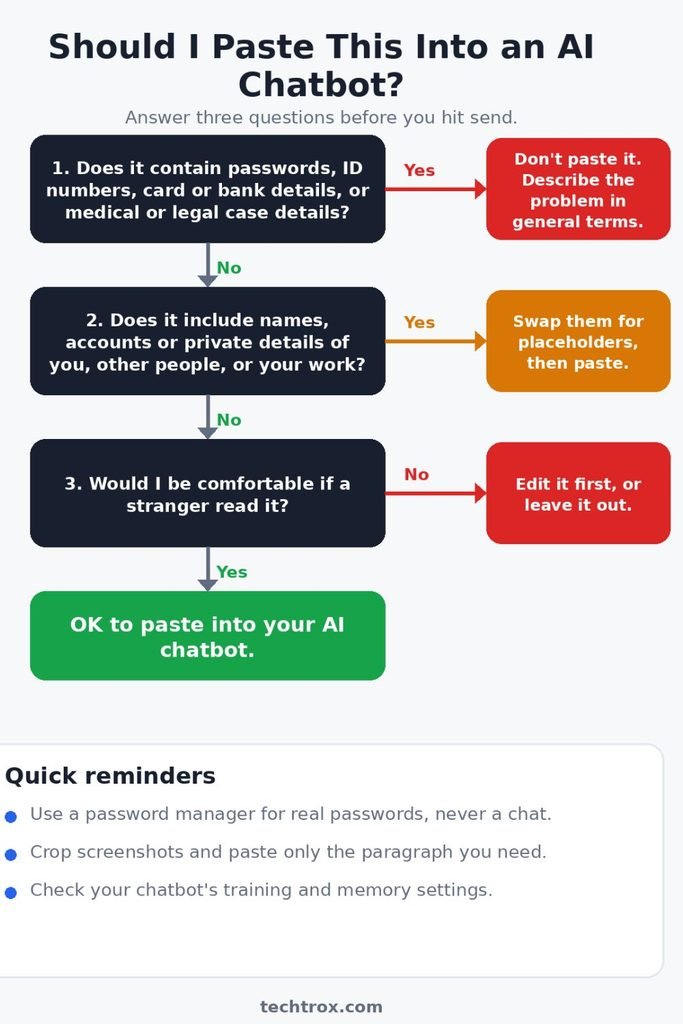
A simple rule works here. If you would be comfortable posting it on a public forum, it is probably fine to paste into an AI chatbot. If not, edit it first.
How to Write Safe Prompts: The Swap Method {#swap-method}
Writing safe prompts doesn’t mean giving up useful answers. You swap real details for placeholders, or for made-up examples that behave the same way. The AI solves the problem just as well, and nothing sensitive leaves your device.
| Risky prompt | Safe prompts version |
|---|---|
| “Summarize this email from Ahmed Raza at Nova Traders about invoice #4482 for $3,200.” | “Summarize this email from a client about an overdue invoice of roughly $3,000, then suggest a polite reply.” |
| “Here is my bank statement. Where am I overspending?” | “My monthly totals are rent 1,000, food 400, transport 150, subscriptions 80. Where could I cut?” |
| “Fix this code” (with a live API key inside) | “Fix this function. I replaced the key with YOUR_API_KEY.” |
| “My report from City Hospital says…” | “What does an elevated [marker] usually mean, and what should I ask my doctor?” |
| “Here are our meeting notes from the layoffs discussion…” | “Turn these bullet points into a clear agenda: budget review, hiring plan, timeline.” |
The 10-Second Check Before You Hit Send {#ten-second-check}
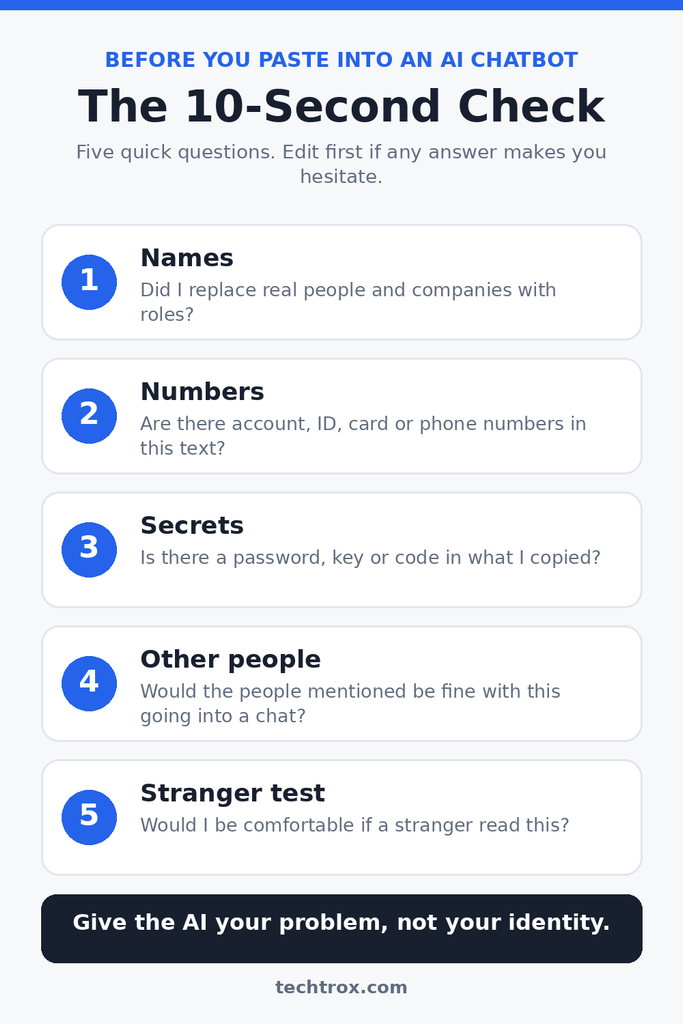
Run through five quick questions. Safe prompts become automatic once you do this a few times.
- Names: Did I replace real people and companies with roles?
- Numbers: Are there account, ID, card, or phone numbers in this text?
- Secrets: Is there a password, key, or code anywhere in what I copied?
- Other people: Would the people mentioned be fine with this being pasted into a chat?
- The stranger test: Would I be comfortable if a stranger read this?
If any answer makes you hesitate, edit the prompt first. Safe prompts take an extra ten seconds, and that is cheap compared with the cost of a leak.
5 Safe Prompt Templates You Can Copy {#prompt-templates}
Fill in the brackets yourself, then paste the template into your AI chatbot. Each one is written so the AI gets what it needs and nothing more.
1. Summarize a message and draft a reply
Summarize the message below in five bullet points, then draft a polite reply. I replaced names and numbers with [CLIENT], [AMOUNT], and [DATE] on purpose. [Paste the message here]
2. Improve a resume
Review this resume for clarity and impact, and suggest five improvements for a [JOB TITLE] role. I removed my name, phone number, email, and address. [Paste the resume text here]
3. Debug code
Find the bug in this function and explain the fix. I replaced all keys, passwords, and web addresses with placeholders like YOUR_API_KEY. [Paste only the relevant function here]
4. Understand a health term
Explain in plain language what an elevated [MARKER] can mean, and list five questions I could ask my doctor. Please don’t diagnose me. I’m not sharing any personal details.
5. Get budgeting help
My monthly totals are rent [AMOUNT], food [AMOUNT], transport [AMOUNT], and subscriptions [AMOUNT]. Suggest three realistic ways to spend less. No account details are needed.
Notice what the templates leave out: no names, no account numbers, no real files. You can put the real names back yourself after the AI chatbot answers.
How to Remove Personal Details in 30 Seconds {#remove-details}
Cleaning up text before it goes into an AI chatbot can get tedious, so use these quick habits.
- Use Find and Replace. In Word or Google Docs, open Find and Replace (Ctrl+H on Windows), type the real name, and replace it with [CLIENT]. Repeat for each name, then paste the cleaned text.
- Search for giveaways. Look for the @ symbol, long strings of digits, and “http.” They often reveal emails, account numbers, and private links.
- Crop screenshots before uploading. Use your phone’s photo editor to cut away everything except the part you need.
- Don’t trust a black box on a PDF. A box drawn on top of a PDF can leave the text underneath. Copy only the paragraph you need, or use a proper redaction tool.
- Keep a private key. Note in your own files that [CLIENT] means Ahmed, so you can restore the names in the answer yourself.
💡 Also Read: [Gemini AI 10 Hacks article]
Settings That Reduce the Risk on ChatGPT, Claude, and Gemini {#settings}
Settings help, but they don’t remove the risk. Turning off training or history lowers exposure without making a chat fully private. Here is what each major AI chatbot offers right now.
| AI chatbot | Setting to check | What to know |
|---|---|---|
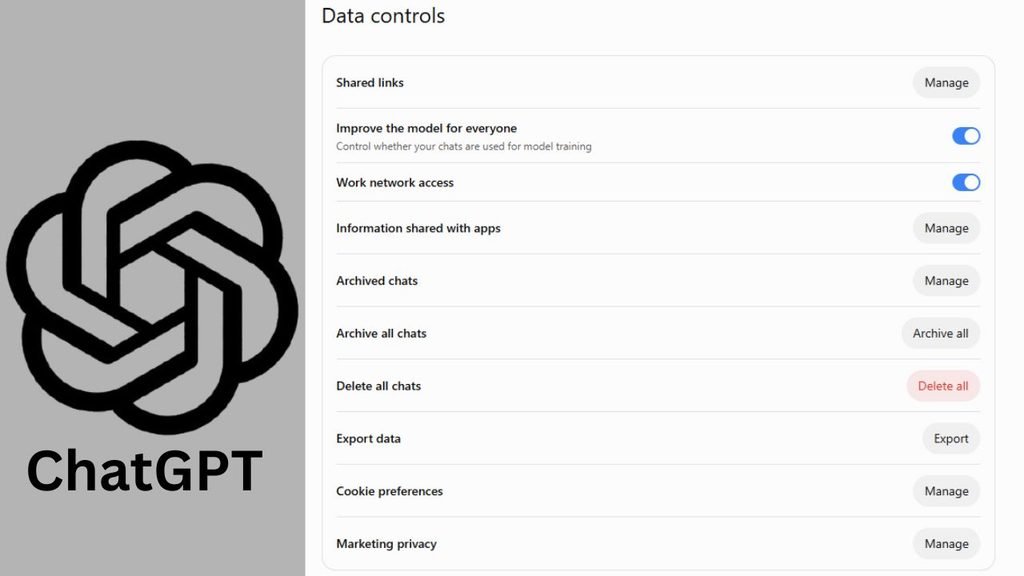
| ChatGPT | Settings > Data Controls > “Improve the model for everyone” | Turn it off and your chats stay in your history but aren’t used for training. Temporary Chats are deleted from OpenAI’s systems after 30 days. |
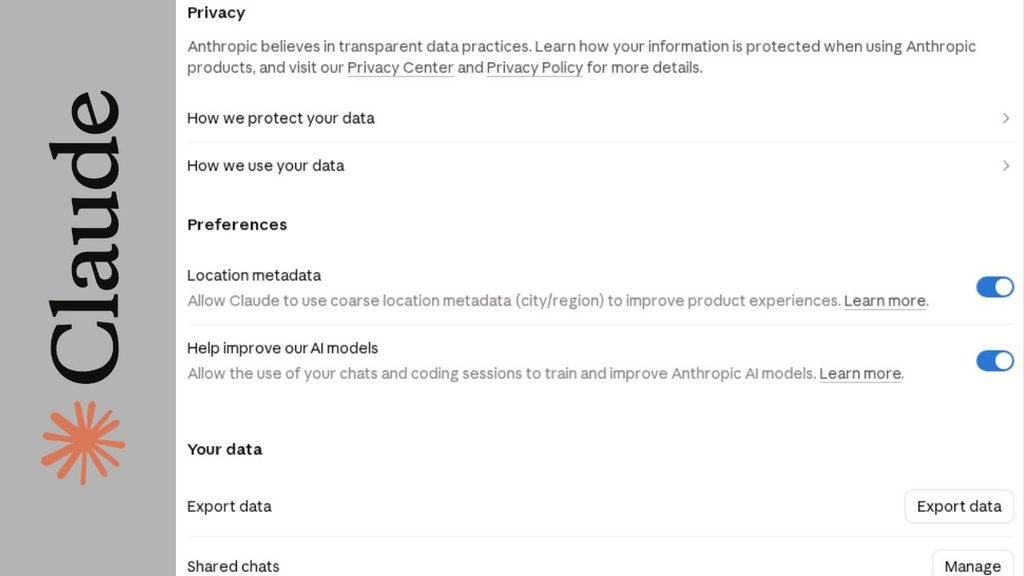
| Claude | Settings > Privacy (the model improvement toggle, often called “Help improve Claude” in news coverage) | Anthropic says consumer chats can be used for training when this is on, so check how it is set on your account. Coverage of the 2025 update says allowing training extends retention to up to five years. |
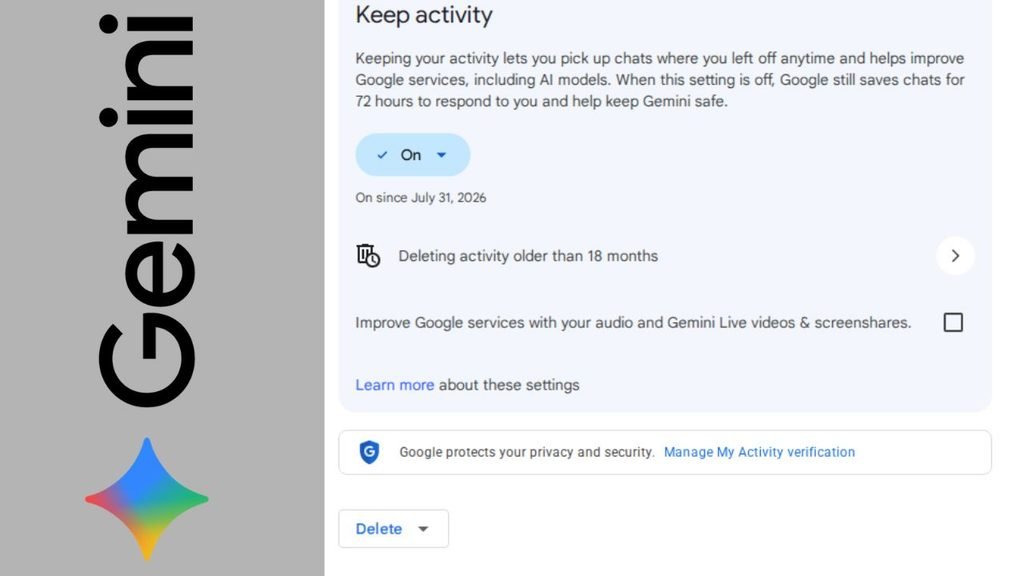
| Gemini | Keep Activity in your Gemini settings | Chats already reviewed by humans are not deleted when you delete your activity. Reviewed samples can be kept for up to three years, separate from your account. |
Retention periods change over time. One law-firm review of Claude’s privacy pages in 2026 noted that the old 30-day figure no longer appears in the policy text. So read the current policy page for whichever tool you use instead of trusting an old blog post, this one included.
✅ Last verified: October 10, 2026. The ChatGPT details were checked against OpenAI’s Data Controls and Memory help pages, and the Gemini details against Google’s Gemini Apps Privacy Notice. For Claude, Anthropic’s help page points to a model improvement toggle at claude.ai/settings/data-privacy-controls but doesn’t state a retention period, so confirm the current figure in your own settings.
AI Chatbot Memory: The Setting Most People Forget {#chatbot-memory}
Training is only one way your words stick around. Many AI chatbot apps now have a memory feature that carries details from one conversation into the next. That helps with convenience, but it also means something you mentioned once can come back later in an unrelated chat.
OpenAI’s Memory FAQ explains how it works on ChatGPT. You can see and manage what it remembers under Settings > Personalization > Memory. A few details are easy to miss:
- Deleting a saved memory stops future personalization, but it doesn’t remove mentions from past conversations. Delete the original chat too.
- Turning off “Reference chat history” schedules the information drawn from past chats for deletion within 30 days. Your original chats stay in your history until you delete them.
- OpenAI may keep logs of deleted saved memories for up to 30 days for safety and debugging.
- Temporary Chats don’t create or update memories.
Other assistants have their own memory or personalization features, so look for them in each app’s settings. If you paste something sensitive by mistake, check the memory list as well as the chat history.
Hidden Traps: Shared Links, Deleted Chats, and Temporary Mode {#hidden-traps}
Shared links can become public. In July 2025, Fast Company reported nearly 4,500 shared ChatGPT conversations showing up in Google results, some about mental health and relationships. OpenAI removed the “make this chat discoverable” option after the backlash.
Deleting a chat from your history doesn’t delete its share link. To check, open Settings, then Data Controls, then Shared Links, and delete anything you no longer want online.
Temporary chats are not a free pass. They are useful, but they are not a reason to share passwords, IDs, or payment details with an AI chatbot.
“Deleted” doesn’t always mean gone. As noted above, Gemini chats that human reviewers have already seen stay put even after you clear your activity.
What to Do If You Already Pasted Something Sensitive {#already-pasted}
Don’t panic, but act quickly. Work through these steps in order.
- Change the password or revoke the key right away, and treat it as exposed.
- Delete the conversation, any shared links tied to it, and any saved memory that picked up the detail.
- Turn off training in the AI chatbot’s settings for future chats.
- Tell your IT team or manager if it was work data. Early honesty usually beats a late discovery.
- Contact your bank or the ID-issuing office if card or ID numbers were involved, and watch your accounts for unusual activity.
Deleting a chat doesn’t guarantee it is erased from every system, which is why prevention beats cleanup.
Using an AI Chatbot at Work: Paid Plans, Company Rules, and Who Can See Your Prompts {#ai-at-work}
Business plans often come with better data controls, but the details depend on the contract. OpenAI says its Team, Enterprise, and Edu plans include extra data controls. Anthropic’s business and API offerings were left out of its consumer training change.
Even so, your company’s settings and policies decide what is protected. A few habits help in any workplace:
- Use approved tools only. Keep client data, financial records, and internal documents inside tools your company has cleared.
- Keep passwords in a password manager, never in a prompt.
- Ask one question before pasting: could this safely be shared outside the company? If not, don’t enter it.
- Assume work devices are visible. Some employers install browser-based safeguards that flag or redact sensitive text in AI prompts. One vendor’s product page says administrators can review prompts typed on work devices. That is a company’s marketing claim about its own product, but it shows what is technically possible.
- Treat everyone’s data as shared responsibility. Protecting customer information isn’t only the IT team’s job.
If your workplace has no AI policy, ask for one. Clear rules protect you as much as the company.
Conclusion: Edit Before You Paste {#conclusion}
An AI chatbot is useful, and you don’t need to stop using it. You just need a small habit: remove what identifies you, other people, or your work before you paste.
Never paste passwords, ID numbers, card details, medical records, legal strategy, or confidential work files into an AI chatbot. Use the swap method, check your settings and memory, clean up old shared links, and read each tool’s current privacy page. Safe prompts cost you ten seconds and protect you for years.
📖 About the Author
Waqar Ahmad is a tech and digital lifestyle writer with over 6 years of experience covering mobile apps, AI tools, communication platforms, and internet infrastructure. He writes to make technology and privacy topics understandable for everyday readers.
Frequently Asked Questions {#faqs}
1. Is it safe to share personal information with an AI chatbot?
Not completely. Stanford researchers found that major developers appear to use chat data for training by default, and some keep it for a long time. Share as little personal detail as possible with any AI chatbot, and use opt-out settings where they exist.
2. What should you never tell an AI chatbot?
Passwords, ID numbers, bank and card details, medical records, legal case details, confidential work files, and other people’s private data. Safe prompts replace these with placeholders.
3. Does turning off chat history make my conversations private?
It reduces exposure but doesn’t make chats fully private. ChatGPT’s Temporary Chats are deleted from OpenAI’s systems after 30 days, and they are still not a place for secrets.
4. Can my AI chatbot conversations be used in court?
Possibly. In United States v. Heppner, a federal judge held that a defendant’s chats with a public AI chatbot weren’t privileged. Courts are still developing this area, so avoid discussing legal matters with an AI chatbot and speak to a lawyer.
5. Is Claude, ChatGPT, or Gemini safer?
None is risk-free. Each offers settings that limit training use, but the details and retention periods differ and change over time. Check the current policy of whichever AI chatbot you use.
6. Does an AI chatbot remember what I tell it?
It can. When Memory is on, ChatGPT can draw on saved memories and past chats. You can view and delete them under Settings > Personalization > Memory, and Temporary Chats don’t create memories.
7. Can my employer see what I type into an AI chatbot?
It depends on the company. Some workplace security tools can flag or redact sensitive text, and administrators may be able to review prompts typed on work devices. Assume yes on a work device and check your IT policy.
8. How can I use an AI chatbot at work without leaking company data?
Follow your employer’s policy, use a company-approved business plan if one exists, and replace names, numbers, and code secrets with placeholders. When unsure, ask your IT team first.
Sources {#sources}
- Stanford HAI, “Be Careful What You Tell Your AI Chatbot”: https://hai.stanford.edu/news/be-careful-what-you-tell-your-ai-chatbot
- Stanford researchers, “User Privacy and Large Language Models” (arXiv): https://arxiv.org/pdf/2509.05382
- Stanford Law CIS, “Be Careful What You Tell Your AI Chatbot”: https://cyberlaw.stanford.edu/press/be-careful-what-you-tell-your-ai-chatbot
- DuckDuckGo Research, “AI privacy survey” (August 2026): https://spreadprivacy.com/ai-privacy-survey-aug26/
- Google, Gemini Apps Privacy Notice: https://support.google.com/gemini/answer/13594961
- OpenAI Help Center, Data Controls FAQ: https://help.openai.com/articles/7730893
- OpenAI Help Center, Memory FAQ: https://help.openai.com/en/articles/8590148-memory-faq
- Orrick, “Court Rules AI Conversations Are Not Privileged”: https://www.orrick.com/Insights/2026/03/Court-Rules-AI-Conversations-Are-Not-Privileged-What-United-States-v-Heppner-Means-for-You
- The Next Web, “A US judge ruled that a fraud defendant’s AI chats with Claude are not privileged”: https://thenextweb.com/news/us-court-ai-chats-not-privileged
- Bloomberg via Yahoo, “Samsung bans employees from using AI tools like ChatGPT”: https://tech.yahoo.com/ai/articles/samsung-bans-employees-using-ai-130806711.html
- Search Engine Journal, “OpenAI Is Pulling Shared ChatGPT Chats From Google Search”: https://www.searchenginejournal.com/openai-is-pulling-shared-chatgpt-chats-from-google-search/552671/
- TechRadar, “OpenAI pulls chat sharing tool after Google search privacy scare”: https://www.techradar.com/ai-platforms-assistants/chatgpt/openai-pulls-chat-sharing-tool-after-google-search-privacy-scare
- HuffPost, “Experts Warn You Should Never Share These 5 Things With ChatGPT”: https://www.huffpost.com/entry/experts-warn-you-should-never-share-these-5-things-with-chatgpt-and-what-you-can-do-if-you-already-did-goog_l_6aa2e7f7e4b0b2af35a4da5d
- Bitdefender, “What Not to Share With AI Chatbots”: https://www.bitdefender.com/en-us/blog/hotforsecurity/what-not-to-share-with-ai-chatbots
- Safely Using AI, “What You Should Never Paste Into a Chatbot”: https://safelyusingai.com/what-you-should-never-paste-into-a-chatbot/
- Summit, “Safe AI” product page (vendor marketing): https://summithq.com/services/application-hosting/safe-ai/
- University of Kentucky ITS, Data Privacy Week guidance: https://its.uky.edu/news/its-data-privacy-week-heres-why-you-should-never-share-your-personal-information-chatbots
- Shelly Palmer, “Anthropic’s Privacy Pivot”: https://shellypalmer.com/2025/08/anthropics-privacy-pivot-users-must-opt-out-by-september-28/


Pingback: Best Free AI Tools for Content Creators in 2026 (12 Picks)