
📋 Editorial Notice: This article is for informational purposes only. All information is based on official WhatsApp announcements and verified sources.
📅 Published: 16 August 2025
WhatsApp Calling Features — Schedule Calls, Raise Hand & Reactions Guide 2025
📋 Table of Contents
- What Changed in This Update?
- Schedule WhatsApp Calls in Advance
- Raise Hand — Organized Group Calls
- Emoji Reactions in Calls
- Upgraded Call Links
- Is WhatsApp Becoming a Work Tool?
- Conclusion
- About the Author
- Frequently Asked Questions
Have you ever tried to organize a WhatsApp group call with more than three people? If yes, you already know the struggle. There’s the frantic back-and-forth of “are you free at 7?”, the one person who always joins 15 minutes late, and the chaos of everyone talking over each other once the call finally starts.
Well, WhatsApp has heard all of it. In August 2025, the platform rolled out a set of WhatsApp Calling Features that tackle these exact pain points. We’re talking about the ability to schedule calls in advance, a raise your hand option for organized group discussions, and emoji reactions you can send mid-call without saying a word.
These WhatsApp Calling Features might sound like small tweaks on the surface, but in practice they change the experience of group calling in a meaningful way. Let’s break down each one.
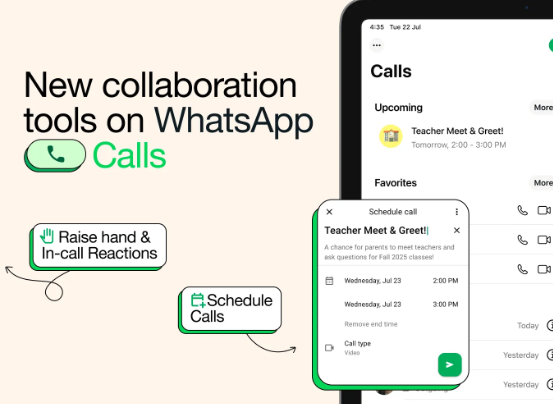
📅 WhatsApp Calling Features — Schedule Calls in Advance {#schedule}
The Problem This Feature Solves
Picture this: it’s Sunday afternoon and you want to set up a team briefing for Monday morning. Or your cousins are scattered across four cities and you want to finally get everyone on a call. In the past, this involved a lot of coordination — sometimes a separate message thread just to agree on a time.
WhatsApp now has a native scheduling tool built right into the app. No third-party links, no external calendar invites, no confusion.
How to Schedule a Call Using the New WhatsApp Calling Features
The process is straightforward and takes less than a minute:
- Open WhatsApp and go to the Calls tab
- Tap the “+” (plus) button at the top right
- Select “Schedule Call”
- Choose your call type — voice or video
- Set the date and time
- Add individual contacts or select an entire group
- WhatsApp creates a unique call link you can share
Once set up, the scheduled call appears in your Calls tab with all the details — attendee list, date, time, and a shareable link. You can even add it directly to your phone’s calendar app so it shows up alongside your other appointments.
All participants receive an automatic notification reminder when the call is about to begin. No more “oh wait, was that today?” moments.
Real-world scenario: Your family is spread across Karachi, London, and Toronto. Instead of ten messages to agree on a time, you schedule the call once using these new WhatsApp Calling Features, share the link in the family group, and everyone gets an automatic reminder. Done.
✋ WhatsApp Calling Features — Raise Hand for Organized Group Calls {#raise-hand}
Why Group Calls Needed This WhatsApp Calling Feature
Anyone who has managed a WhatsApp call with 10+ people knows the feeling. Everyone has something to say, nobody knows when to jump in, and half the conversation gets lost in the noise. It’s exhausting for participants and near-impossible to manage as the host.
The new Raise Hand feature — one of the most useful WhatsApp Calling Features in this update — borrows directly from tools like Zoom and Google Meet.
How Raise Hand Works
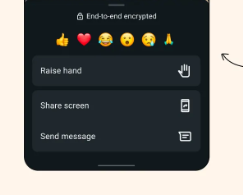
During any group call, you’ll see a raise hand button in the call interface. Tap it when you want to speak, and all other participants — including the organizer — can see that you’re waiting for your turn. No interrupting, no awkward crossover moments, no frustration.
It’s particularly useful in:
- Remote team meetings where multiple people want to give updates
- Online study or tutoring sessions with students who have questions
- Large family calls where the older generation gets talked over
- Community or organizational calls with a formal agenda
Once you’ve said your piece, simply lower your hand and the call continues. Clean, simple, and much more considerate than the alternative.
😄 WhatsApp Calling Features — Emoji Reactions in Calls {#reactions}
Small Feature, Big Difference
Here’s something that sounds trivial but actually adds a lot of warmth to calls: emoji reactions — a brand new addition in this update.
During a group call, you can now tap on an emoji to react to what’s being said — a thumbs up, a laugh, a heart — and it appears on screen in real time. Everyone can see it, nobody has to pause or unmute themselves, and the conversation keeps flowing.
Think about how this plays out in real life. Someone shares good news on a family call. Instead of everyone shouting “amazing!” at once and creating audio chaos, people tap a heart or a celebration emoji. The moment is acknowledged, the emotion is shared, and the person speaking knows their news landed.
It’s the digital version of nodding, smiling, or laughing along in a face-to-face conversation. It makes group calls feel much more like actual conversations rather than audio broadcasts.
🔗 WhatsApp Calling Features — Upgraded Call Links {#call-links}
Call links got a meaningful update alongside this release.
Previously, once you shared a call link, you had no way of knowing if anyone had actually used it to join. Now, call link creators receive a notification whenever someone joins via the link. It sounds small, but it gives you much better awareness of who’s on the call and when — useful both for informal catch-ups and more organized group meetings.
💡 Also Read: WhatsApp also rolled out a Username feature — letting you connect with people without sharing your phone number.
💼 Is WhatsApp Becoming a Work Tool? {#work-tool}
There’s a bigger story here beyond just these WhatsApp Calling Features.
WhatsApp already has over 3 billion users worldwide, and a huge number of them already use it informally for work — sharing updates, sending voice notes, quick team calls. What’s been missing is the structure that professional tools like Zoom, Microsoft Teams, or Google Meet provide.
With these new WhatsApp Calling Features — scheduled calls, raise hand, and reactions — WhatsApp is bridging that gap. And it has one very significant advantage over dedicated work tools: everyone already has it. There’s no need to sign up for a new platform, learn a new interface, or send onboarding instructions. Your team, your clients, your collaborators — they’re already on WhatsApp.
All calls remain fully end-to-end encrypted, which is a reassuring foundation whether you’re coordinating sensitive work discussions or just catching up with family.
📌 Official source: Calling on WhatsApp: New ways to plan ahead and take part — WhatsApp Official Blog, August 14, 2025
Conclusion: WhatsApp Calling Features Make Group Calls Finally Worth Using {#conclusion}
The new WhatsApp Calling Features don’t reinvent the wheel, but they solve real problems that millions of people deal with every day. Scheduling a call takes the friction out of coordination. Raise Hand brings order to large group discussions. Emoji reactions add humanity and warmth without disrupting the flow.
Together, these WhatsApp Calling Features make group calls feel less like a free-for-all and more like an actual, structured conversation. Whether you’re using WhatsApp for a work meeting, a family catch-up, or a study group — the experience is genuinely better now.
If you haven’t tried the new WhatsApp Calling Features yet, it’s worth doing the next time you need to coordinate with more than two people. You might not go back to the old way.
📖 About the Author {#author}
[Waqar Ahmad] is a tech and digital lifestyle writer with over 6 years of experience covering mobile apps, communication tools, and productivity software. Committed to making tech updates understandable and useful for everyday readers.
❓ Frequently Asked Questions {#faq}
1. What are the new WhatsApp Calling Features launched in 2025?
The new WhatsApp Calling Features include three major additions: scheduled calls that let you plan calls in advance with automatic reminders, a raise hand button for organized group discussions, and emoji reactions you can send during a call without interrupting. Call links also got an upgrade — creators now get notified when someone joins via the link.
2. How do I use WhatsApp Calling Features to schedule a call?
To use the scheduling feature in the new WhatsApp Calling Features, open WhatsApp → go to the Calls tab → tap the “+” button → select “Schedule Call” → choose voice or video → set date and time → add contacts or a group → share the generated call link. All participants receive an automatic reminder before the call begins.
3. What is the Raise Hand feature in WhatsApp Calling Features?
The Raise Hand button is part of the new WhatsApp Calling Features for group calls. During a call, tap the raise hand button to signal that you want to speak without interrupting whoever is talking. All participants and the organizer can see your raised hand. Lower it once you’ve spoken.
4. Are WhatsApp Calling Features available to everyone?
Yes, these WhatsApp Calling Features are rolling out globally to all WhatsApp users. Make sure your WhatsApp app is updated to the latest version from the App Store or Google Play Store to access all these features.
5. Are WhatsApp Calling Features end-to-end encrypted?
Yes. All WhatsApp Calling Features — including scheduled calls, group calls with raise hand, and emoji reactions — remain fully end-to-end encrypted. No one outside the call, including WhatsApp itself, can access the content of your conversations.