Published: August 23, 2026
There’s a particular kind of frustration that comes from standing in front of your own phone, doing everything right, and still watching it reject you. Fingerprint face unlock not working is one of the most common complaints people search for, and the good news is that it’s rarely a hardware problem. Most cases come down to something small and fixable — a dirty sensor, the wrong lighting, or a security feature doing exactly what it’s supposed to do.
This guide walks through the real causes behind fingerprint and face unlock failing in 2026, based on what people are actually running into, along with fixes for each one.
Table of Contents
- Why This Problem Feels So Random
- The Real Causes (and How to Fix Each One)
- When It’s Time to Stop Troubleshooting Yourself
- FAQs
Why This Problem Feels So Random
One reason fingerprint face unlock not working is so annoying is that it rarely happens the same way twice. Sometimes it fails once and then works fine for weeks. Sometimes it stops completely and nothing brings it back. That inconsistency isn’t random at all — it’s because there are several completely different things that can cause a biometric failure, and each one needs a different fix. Cleaning the sensor won’t help if the real problem is a firmware conflict after a screen repair, and resetting your settings won’t help if the actual issue is just a smudge on the lens. The fastest way through this is matching the fix to the actual cause, rather than trying everything at once.
The Real Causes (and How to Fix Each One)
1. The sensor or your finger is dirty, dry, or damp
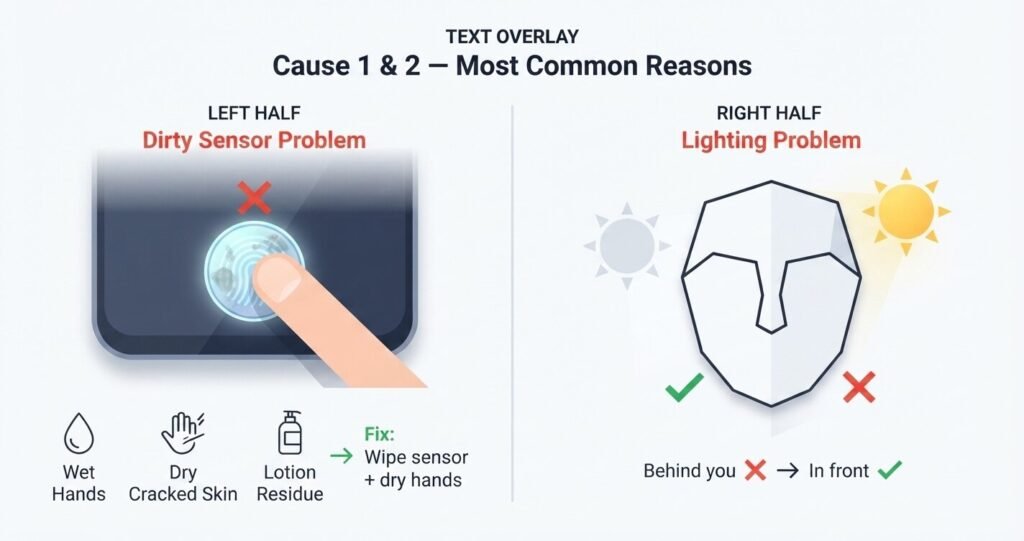
This is the single most common reason fingerprint recognition suddenly gets unreliable, and it’s also the easiest to rule out. Skin oils, lotion residue, or a thin layer of dust on the sensor can throw off the reading enough that the phone simply doesn’t recognize a match. Dry, cracked skin causes the same problem from the other direction — the ridges the sensor relies on aren’t showing up clearly.
Fix it: Wipe the sensor gently with a soft, lint-free cloth. Dry your hands fully before trying again, and if your skin tends to be dry or cracked, a small amount of moisturizer can genuinely help before your next attempt. If you’re using a thick tempered-glass screen protector, especially with an under-display optical sensor, try removing it and testing again — some are simply incompatible with certain sensor types.
2. Fingerprint Face Unlock is failing because of lighting, not your face
Facial recognition needs to see clearly to build an accurate map of your features, and that depends heavily on light. A bright window or lamp positioned directly behind you can wash out your face just as effectively as standing in a dark room. This is one of the most overlooked causes because people assume the issue must be with the camera itself, when it’s really about where the light is coming from.
Read Our Complete Article About Facebook Monetization Tools
Fix it: Move somewhere with more even lighting — ideally facing a light source rather than having one behind you. Also check that nothing is physically blocking the sensor: a mask, sunglasses, or a scarf pulled too high can all interfere with what the camera needs to see.
Read About Use the fingerprint sensor on your Galaxy phone or tablet
3. A recent software update quietly reset something
Operating system updates occasionally toggle biometric settings off without any clear notification, or introduce a small bug that gets fixed in a follow-up patch a week or two later. If your fingerprint face unlock not working issue started right after an update, this is worth checking before anything else.
Fix it: Open your device’s security settings and confirm the fingerprint or face unlock toggle is actually still switched on — it sounds obvious, but this gets missed constantly. Then check whether a newer update is available, since manufacturers tend to push out quick fixes once enough people report the same bug.
4. It only fails at certain times — and that’s actually intentional
This is the cause that confuses people the most, because nothing looks wrong on the surface. Both iOS and Android biometric systems are designed to fall back to a PIN or passcode under specific conditions: after several failed unlock attempts, right after a restart, or once the device hasn’t been unlocked biometrically for a set stretch of time (often somewhere around 48 hours).
Fix it: There isn’t one, because this isn’t a malfunction — it’s a deliberate security layer working as designed. The correct response is simply to enter your passcode when asked, which re-establishes trust and lets biometric unlock resume normally afterward.
5. The phone had a screen or camera repair recently
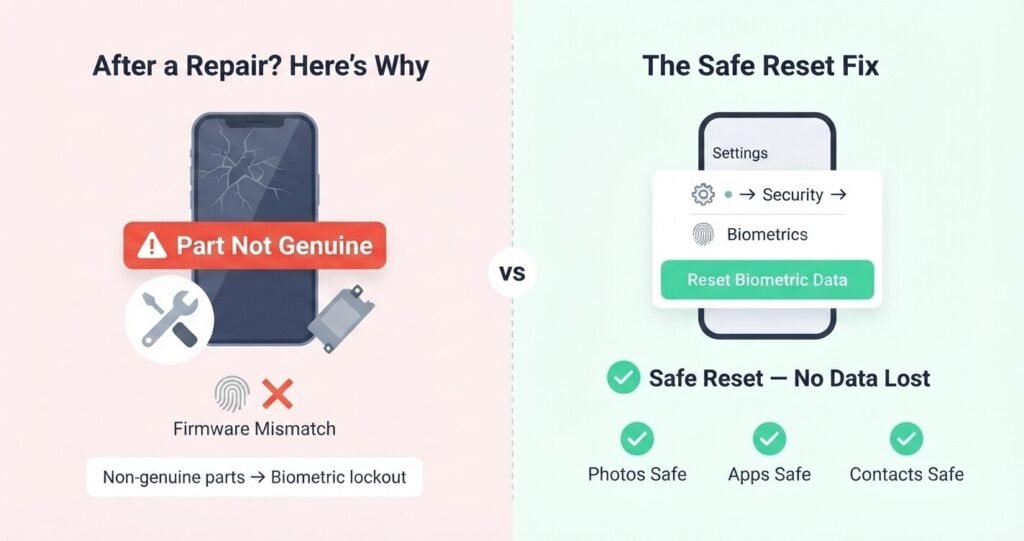
This is the cause people are least likely to suspect, and it’s also one of the more serious ones. Many manufacturers link fingerprint and face sensors to specific hardware components at a firmware level. If a screen or front camera was recently replaced using non-genuine or aftermarket parts, the phone may refuse to trust that component — not because it’s damaged, but because the software can’t verify it’s the original part.
Fix it: If your unlock issues started immediately after a repair, this is very likely the reason. The only real fix is having the repair redone with genuine or OEM-equivalent parts by a technician experienced with biometric calibration — cleaning the sensor or adjusting settings won’t resolve a firmware-level mismatch.
6.Fingerprint Face Unlock works everywhere except one specific app
When this happens, the issue usually isn’t your phone’s actual sensor — it’s that particular app’s own biometric permission or integration. Some apps use their own biometric prompts layered on top of the system’s authentication, and those can glitch independently of the phone itself.
Fix it: Clear the cache for that specific app and check its individual settings for a biometric login toggle. It’s also worth confirming you’re using your device’s built-in, system-level authentication rather than a separate third-party “face unlock” app downloaded from an app store — those don’t use real secure hardware and are worth avoiding for both security and reliability reasons.
Read Our Complete Article About Etsy Course
7. Nothing above worked, even after re-registering
If you’ve cleaned the sensor, fixed the lighting, confirmed your settings, and re-enrolled your fingerprint or face data, and it’s still failing, the next reasonable step is a settings reset rather than jumping straight to a full factory reset. Resetting network and biometric settings clears out potentially corrupted authentication data without touching your photos, apps, or personal files.
Fix it: Go into your device settings and look for a reset option that specifically targets network and biometric data rather than a full wipe. This resolves more of these stubborn cases than people expect, and it’s worth trying before assuming there’s a hardware fault that needs professional repair.
When It’s Time to Stop Troubleshooting Yourself
Most cases of fingerprint face unlock not working get resolved through the steps above, usually within a few minutes. But there’s one clear signal that it’s time to involve a professional rather than keep trying settings tweaks: if the problem started immediately after a screen or camera repair, especially one done with parts that weren’t genuine or manufacturer-certified. That points to a hardware-level lockout rather than something you can fix through software, and a qualified repair technician is the faster, more reliable path forward from there.
Read our Complete Article About Whatsapp Down Outage
FAQs
1. Why did my Fingerprint Face Unlock suddenly stop working with no changes made? The most common causes are a dirty or damp sensor, a software update that reset a toggle, or the phone’s built-in security feature requiring a passcode after a certain number of hours or failed attempts — that last one is intentional, not a fault.
2. Can a screen protector really cause fingerprint or face unlock to fail? Yes. Thick tempered-glass protectors are known to interfere with under-display fingerprint sensors specifically, and a cracked or dirty protector near the front camera can block face unlock entirely.
3. Is it safe to reset biometric settings without losing my data? Generally, yes. Removing and re-adding fingerprint or face data only clears the stored biometric profile itself — your photos, contacts, and apps remain untouched, though you will need your backup PIN or password to set it back up.
4. Why does face unlock work in some rooms but not others? This almost always comes down to lighting. Facial recognition needs enough even light to map your features accurately, and strong backlighting or very dim rooms can both interfere with an otherwise working sensor.
5. Can a repair shop permanently break Face ID or fingerprint unlock? Yes, if non-genuine parts were used for a screen or camera replacement. Manufacturers often tie biometric sensors to specific hardware at a firmware level, so an aftermarket part can cause the phone to refuse to trust that component going forward.
Conclusion
Fingerprint face unlock not working almost always traces back to something specific and fixable — a smudge on the sensor, the wrong kind of lighting, a toggle that got flipped during an update, or a deliberate security check doing its job. Working through the cause that actually matches your situation, instead of trying random fixes in no particular order, gets most people back into their phone within a few minutes.
If you’ve been through the section that fits your case and it’s still not resolved, especially after a recent repair, that’s a fair sign the issue sits at the hardware level — and getting it looked at by a qualified technician will save more time than continuing to troubleshoot alone.
Fingerprint Face Unlock Is Big Issue In Now A Days